Photo Gallery > Documentation > Interface Overview
In this page, we will give you an overview of Photo Gallery interface which include the work areaand One Admin Panel.Work area consists of navigation links whereas One Admin panel are the modules pane and administration area.
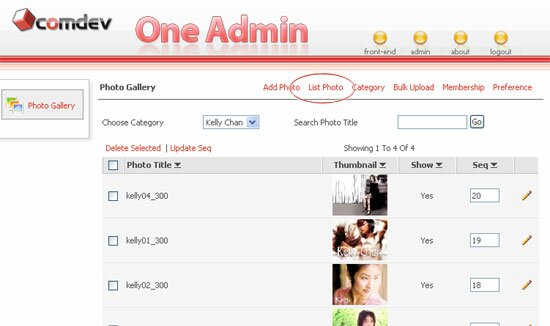 |
Photo Gallery work areas let you perform data entries, delete, edit and save information into your database.
You can create categories to place your photos, upload as many photos as you want, list, sort and search photos, edit or delete photos. You can also configure your preferable setting, for example resizing image photo, choose displayed photo style, alter the Copyright text and other options as well.
Navigation links allow you to navigate entire work areas of Manage Category, Add Photo, List Photo, Bulk Upload, Membership, Approval Tool, and Preference.
One Admin Panel section includes the modules pane and administration area. You can finish your work one after another where you can always switch from Photo Gallery to other component. It is very convenient and helps you save time to find the entire components links in one page, afterall the module pane is just located on your left.
Administration area can be accessed by Administrator only. He or she can change the information and settings, install component, re-arrange modules sequence in the menu area, manage user and define front-end CSS.
|
|
|
|

